
How to Get the Maybank Manchester United Debit Card
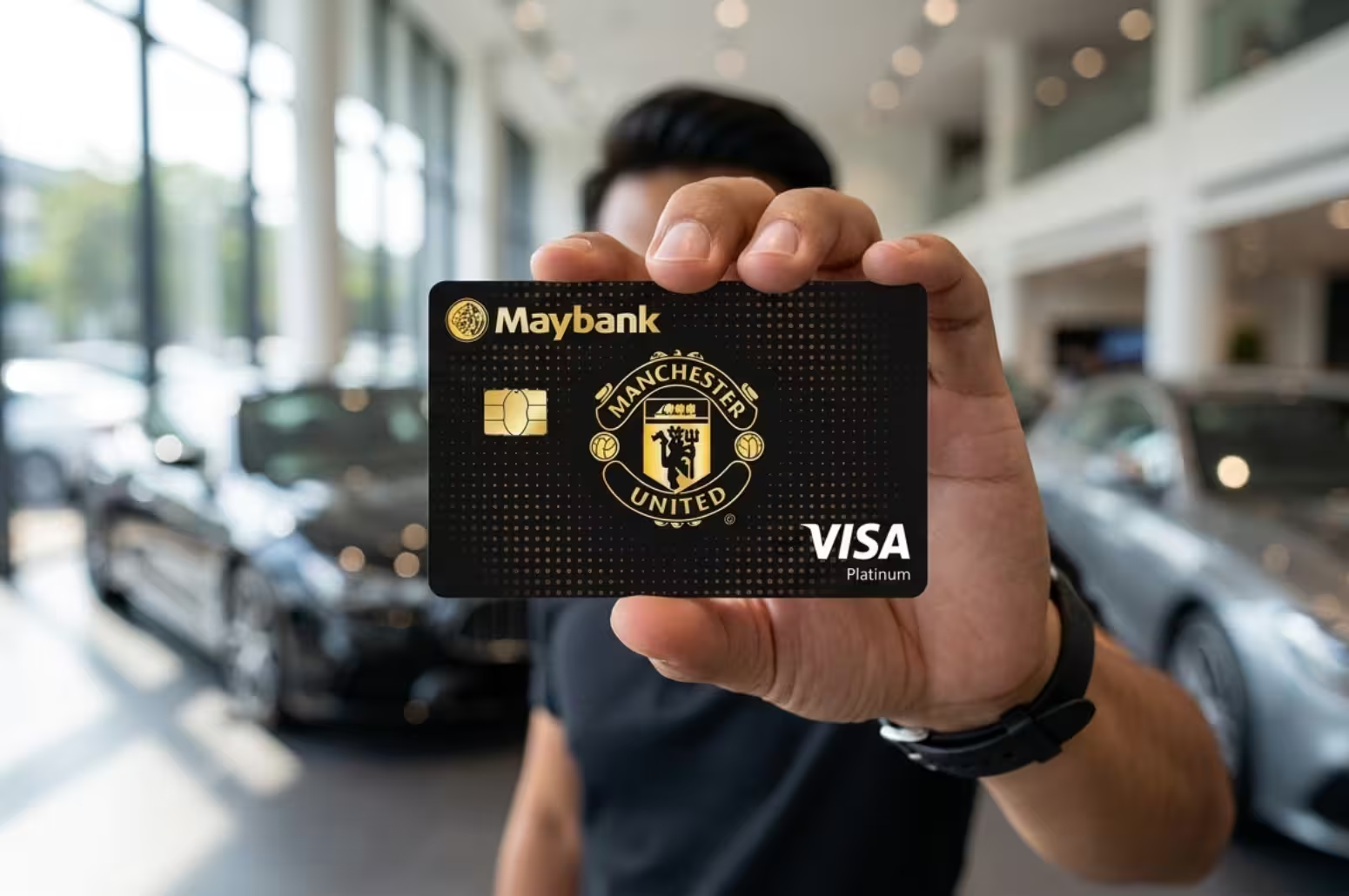
If you bleed red on match days and want a piece of plastic that shows it, the Maybank Manchester United Visa Debit Card is built for you. The latest version trades the old look for a bold black-and-gold design aimed squarely at Red Devils fans. The good news: getting one is straightforward, there’s no income requirement, and there are no annual fees. Here’s exactly how to do it, whether you’re brand new to Maybank or already bank with them.

Before You Start: Who Can Apply
You’ll need to be a Maybank savings or current account holder aged 18 and above. If you’re between 12 and 18 and applying on an imteen account, a parent or guardian must sign an indemnity letter as part of the process.
There’s no minimum income to qualify, no annual fee, and no finance or late charges, since this is a debit card drawing directly from your own account rather than a line of credit.
Have your MyKad ready (or your passport, if you’re a non-Malaysian resident). If you’re opening a fresh account, you may also need supporting documents such as a utility bill or a letter from your employer to verify your address.
Path 1: You’re New to Maybank
If you don’t yet have a Maybank account, you’ll set one up and request the card during the process.
- Open a savings or current account. You can do this at a Maybank branch, through the MAE app, or on the Maybank2u website.
- Request the Manchester United Debit Card during the application. When prompted to choose your debit card, ask for the Maybank Manchester United Visa Debit Card specifically rather than the standard card.
- Complete identity verification at a branch. If you apply online or through the app as a new-to-bank customer, you’ll need to visit a Maybank or Maybank Islamic branch to finish verification when you collect your card. Bring your MyKad or passport.
- Collect or wait for your card. Depending on the branch and availability, you may receive the card on the spot or have it mailed to you.
Path 2: You Already Bank with Maybank
If you already hold a Maybank account and a debit card, you can switch to the Manchester United design online without opening anything new.
- Log in to Maybank2u. Go to www.maybank2u.com.my and sign in to your account.
- Open your card settings. Click into Settings, then select Cards.
- Go to debit card management. Under Manage Debit Cards, choose Debit Card – Replace, Renew, Activate & Block, then select Replace/Renew Card.
- Pick the Manchester United design and confirm. Select the Manchester United Visa Debit Card and submit your request. A replacement fee of RM12 applies.
You can also do this in person at any Maybank branch if you’d rather handle it over the counter.
What to Expect After Applying
Once approved, the card is delivered or issued for collection, and you’ll be able to use it like any Visa debit card: shopping at Visa outlets worldwide, ATM withdrawals locally and overseas, bill payments, and transfers. The default daily purchase limit is RM1,000, adjustable up to RM5,000 through Maybank2u or an ATM. If you plan to use it abroad, activate the overseas flag via Maybank2u or an ATM first.
A Couple of Things Worth Checking
The black-and-gold design is the current edition, so it’s worth confirming at your branch or on the site whether it’s available for instant issuance or only by mail, as this can vary by location. It’s also a good idea to ask about any ongoing Manchester United cardmember promotions, since these rotate and the perks (travel discounts, official store offers, and the like) change throughout the year.
Final thoughts
- New customers: Open an account (branch, MAE app, or Maybank2u) and request the card; verify your identity at a branch.
- Existing customers: Log in to Maybank2u, go to Settings → Cards → Manage Debit Cards → Replace/Renew, and pick the Manchester United design (RM12 fee).
- Bring: MyKad or passport, plus address-verification documents if opening a new account.
- No income requirement, no annual fee.
Other News
You might also like
 looptalk
Why JAKIM Is Investigating The Weeknd’s KL Concert
Table of Contents What triggered the investigation What they objected to How the approval system works, and why…
 looptalk
The Weeknd KL 2026: Full Event Guide & Show Schedule
Table of Contents Show Schedule: What Time Does The Weeknd Go On Stage? Operating Hours for On-Site Facilities…
 looptalk
My Chemical Romance Adds More Tickets for KL Shows
Table of Contents What's New? Concert Details Full Ticket Price List Why Do More Tickets Keep Dropping? Tips…